General structure of the YAML parsers
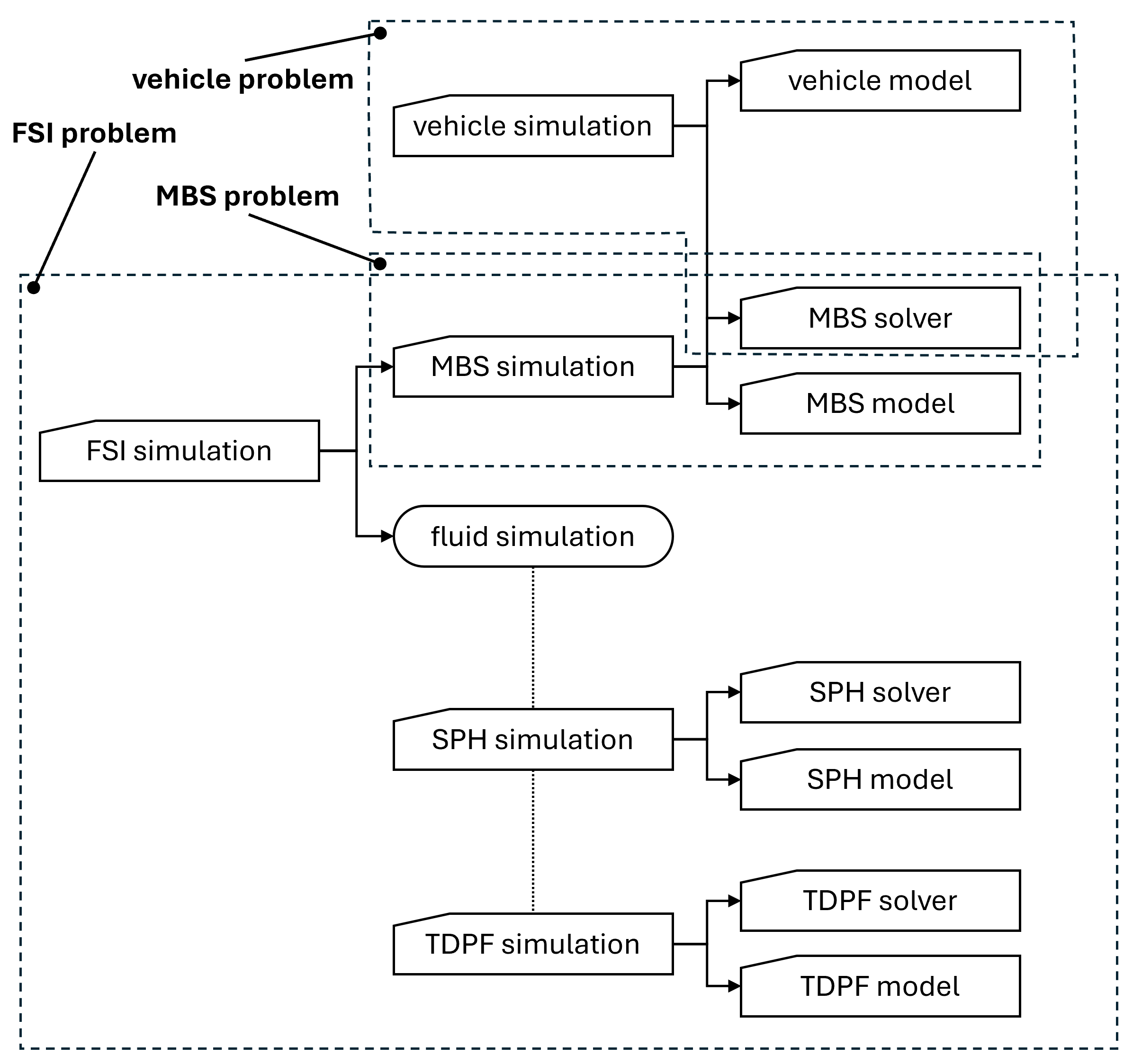
The Chrono YAML parsers allow running Chrono simulations fully specified through YAML files without the need for writing and building user code. To this end, a complete Chrono simulation via YAML files requires specification of both Chrono models and Chrono solvers. Currently, the Chrono YAML parsers support rigid multibody, vehicle, and FSI simulations. For any type of Chrono simulation, the user is expected to provide:
- a top-level YAML simulation file which specifies the model to be simulated and the solvers used for the simulation, as well as optional output and run-time visualization settings,
- a YAML model file with a description of the respective Chrono model (MBS, vehicle, or FSI), and
- a YAML solver file with a description of the solver type and parameters appropriate for the desired type of simulation.
These 3 YAML files provide the top of a hierarchy of YAML specification files that fully describe the desired Chrono simulation. Note that FSI problems, which couple MBS and fluid simulations have a deeper hierarchy of YAML specification files, as the top-level FSI simulation file refers to an MBS simulation file and a fluid simulation file.
The various types of Chrono simulations that can be conducted through YAML files and the corresponding required YAML files are shown in the schematic below.
Specification file types
Every YAML specification file declares its kind through a required type key, which the parsers use both to dispatch to the right parser and to verify that a file is being read as the kind it claims to be. The recognized values are:
type | Meaning |
|---|---|
MBS | Rigid multibody simulation, see the MBS simulation schema |
VEHICLE | Vehicle simulation, see the vehicle simulation schema |
FSI | Coupled fluid-solid interaction simulation, see the FSI simulation schema |
SPH | Chrono::FSI-SPH fluid phase, see the FSI-SPH simulation schema |
TDPF | Chrono::FSI-TDPF fluid phase, see the FSI-TDPF simulation schema |
CUSTOM | A file that is not consumed by any Chrono YAML parser, but read by application code |
Values are matched case-insensitively.
CUSTOM exists for files that follow the YAML conventions but are interpreted by user code rather than by one of the parsers above. The participant configuration of a preCICE adapter implemented in a user program is an example: it carries a precice_adapter_config object that the adapter base class reads directly, and neither chrono-version nor type is consumed. Declaring type: CUSTOM documents that intent rather than leaving the reader to infer it from the absence of a recognized type.
An unrecognized type value is not an error. It is reported as CUSTOM together with a warning naming the offending value, so that a misspelling does not silently masquerade as a deliberate CUSTOM declaration.
Reference frames
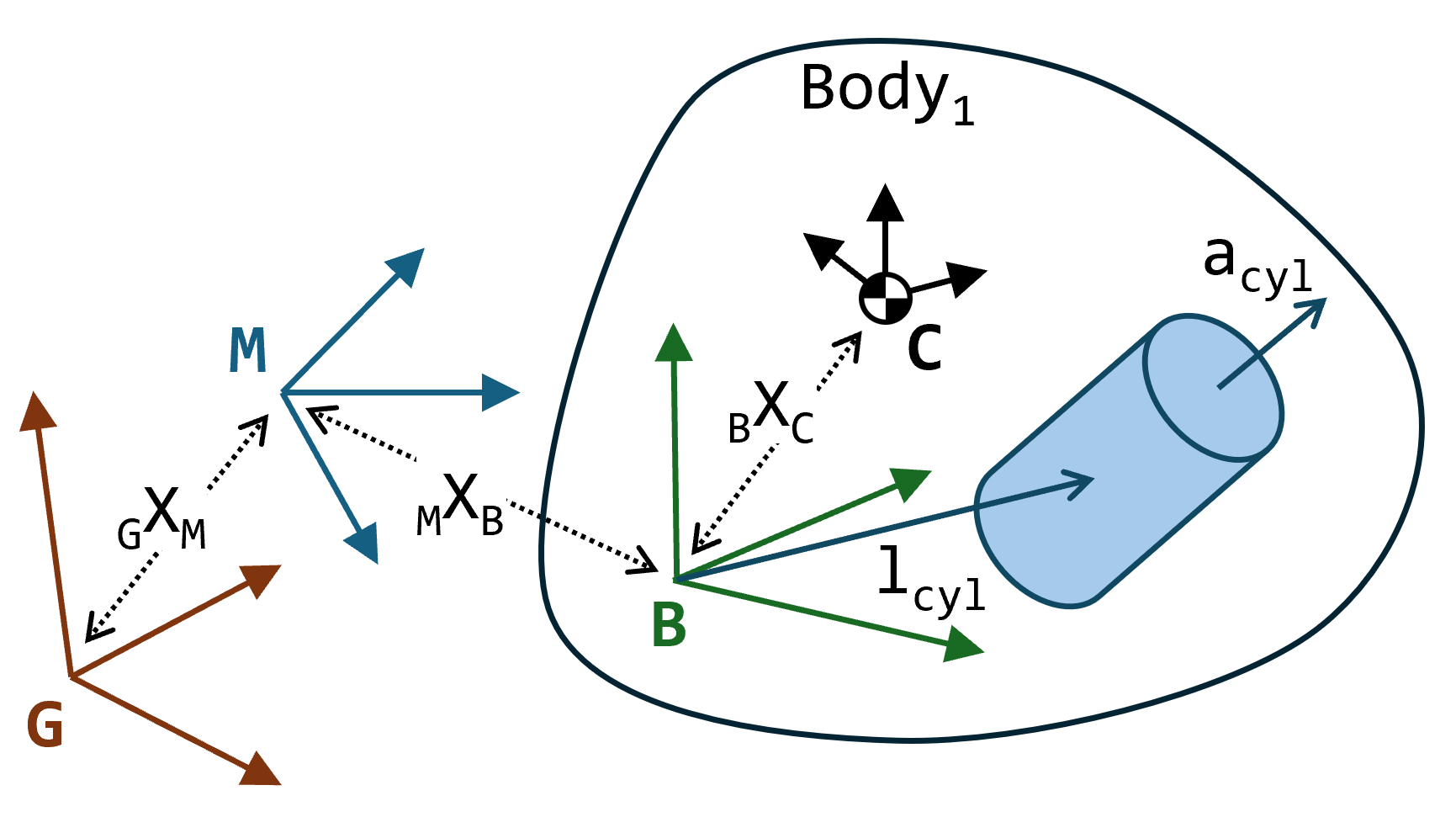
A Chrono model is specified with respect to an implied model reference frame (M). You can think of this reference frame as a global frame for the purpose of defining the model. In other words, all body positions (location and orientation, MXB), joint frames (if joints are specified through an absolute joint frame), TSDA end point locations (if specified through absolute locations), etc. are assumed to be given relative to this model frame.
During instantiation of a YAML-specified Chrono model, the caller has the option of specifying the frame transform from the global reference frame (G) to the model frame of that instance, GXM. This allows placing multiple instances of the same YAML-specified Chrono model in the global scene, at different global locations and with different orientations.
The YAML parser assumes that rigid bodies are specified in the most general (and flexible) manner, namely with an arbitrary body reference frame (B). The body centroidal frame (C) is then specified through a transform (location and orientation, BXC) relative to the body reference frame. The body inertia tensor (composed of inertia moments and, optionally, inertia products) is assumed to be specified relative to the body centroidal frame. Similarly, any geometry (collision and/or visualization) attached to a rigid body is assumed to be specified relative to the body reference frame. For example, a cylindrical shape is fully specified through its radius and length, as well as the location of its center (lcyl) in the body reference frame and the direction of the cylinder axis (acyl) expressed in the body reference frame.
Chrono runner program
If the Chrono::Parser module, with YAML support, is enabled, the run_chrono application can be used to run simulations specified completely through YAML files:
The optional argument out_dir specifies the top-level location of all Chrono simulation outputs (if enabled in the YAML simulation specification). The output directory itself is created if it does not exist, but all its parents must already exist. Optionally, all output can be suppressed (using --no_output), overwriting settings in the YAML files. Similarly, run-time visualization can be disabled (--no_visualization), regardless of the settings in the YAML specification.
The Chrono distribution includes (in the data\yaml\ directory) several YAML specification files for illustrating the use of the Chrono YAML parsers. Some examples can be executed as follows:
- MBS simulation (defaults to a slider-crank mechanism):
./run_chrono -s ../data/yaml/mbs/mbs.yaml
(modify the mbs.yaml file to point to a different MBS model) - Vehicle simulation (defaults to a wheeled vehicle model):
./run_chrono -s ../data/yaml/vehicle/vehicle.yaml
(modify the mbs.yaml file to point to a different vehicle model) - FSI-SPH problem (defaults to a CFD simulation of a cylinder dropped in water):
./run_chrono -s ../data/yaml/fsi/cylinder_drop/fsi_cylinder_drop.yaml
(use a different FSI specification file for other examples) - FSI-TDPF problem
./run_chrono -s ../data/yaml/fsi/sphere_decay/fsi_sphere_decay.yaml